
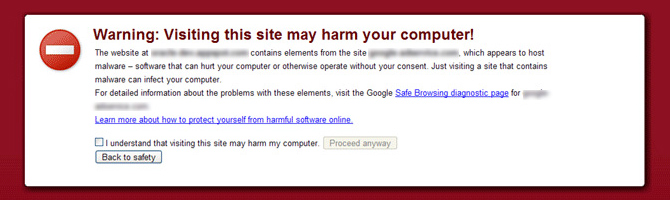
What to do when you have this message on your website?
This alert is displayed when your website or your web application represents a danger for the Internet user. The reasons why Google alerts its users are multiple. For instance, the risk of spreading computer viruses or malwares. Most of the time, when seeing this “Warning”, the user immediately leaves the website concerned and will never try to reconnect to it again. Although it is possible, it is indeed very rare that the user ignores this message and continues his navigation. This generates serious consequences and significant losses at the economic levels but also at the level of the e-reputation of the Web site, whose natural referencing is affected thereafter. It is also possible to
consult the history of a website.
This alert is a sign of a low level of security of the application or website that often results, or will result, in a cyber-attack by malicious persons.
If you are a victim, you have two choices:
-
Audit your website manually:
- Start by analyzing your logs to identify the attack scenario and correct the flaw
- Do a thorough analysis of your server (installed applications, server users, rights management, network…)
- Audit and clean the source code of your website. It is not uncommon to find obfuscated malicious code after an attack
- Change your passwords
- Update all your applications and server
- Once these operations are done, go to: https://support.google.com/webmasters/answer/2600725?hl=en
- Then, follow the instructions to reintegrate your website to the white list of the referrer
- The different steps must be respected in the order stated and some of them require a certain technicality and are sometimes time-consuming.
For people who want to speed up the process of returning to normal, it is strongly recommended to proceed with an automated method.
-
Audit your website automatically:
Use automated tools like
HTTPCS Website Vulnerability Scanner
to test the reliability and tightness of your system. It will allow you to secure your website or your web application and detect backdoors. Automate daily HTTPCS scans and proactively get the right patches. Once all your vulnerabilities have been corrected and tested by HTTPCS, the message will disappear within 24/48 hours and your site will automatically integrate the white list.